

Summary - Master eight core practices for continuous delivery: refocused development, strict version control, deployment pipelines, CI, quality strategies, configuration management, logging and monitoring, and downtime planning. Includes 2025 updates on trunk-based development, progressive delivery, CI security, and observability.
This is the second of three blog posts on continuous delivery. It's an important but often overlooked process that can help SaaS companies and growing firms improve their efficiency and release velocity. The first instalment explained the concept and why companies need to prioritize it. This post covers eight core practices for successful continuous delivery. The final post in the series will explore how to embed these practices into your team culture.
In the last post, I explained that continuous delivery is an efficient and effective way to maintain your software by making product releases smoother and more predictable.
In this post, I'll describe the eight core continuous delivery practices we use at Klipfolio:
- Refocus your development process on continuous delivery
- Be strict about version control
- Define and model your deployment pipeline
- Use continuous integration for your projects
- Create and implement a quality strategy
- Use configuration management tools
- Implement proper logging and monitoring
- Develop a downtime strategy for your software
Refocus your development process on continuous delivery
All software development teams follow a process. When teams adopt continuous delivery, they must reimagine that process from the ground up.
For efficient continuous delivery, clearly define each step along the way. Use an issue tracking tool like Jira throughout the process. Ensure that once code passes through all steps, it emerges production-ready.
Agile teams often establish a definition of done. With continuous delivery, redefine "done" to mean the product is live in production and actively used by customers. This shift is critical—it keeps the entire organization aligned on what completion actually means.
The following diagram shows what an end-to-end continuous delivery process looks like. We track units of work (called "issues") throughout their full lifecycle, not just during implementation. This matters because, as noted in the first post, continuous delivery affects your entire business, not just the development team.
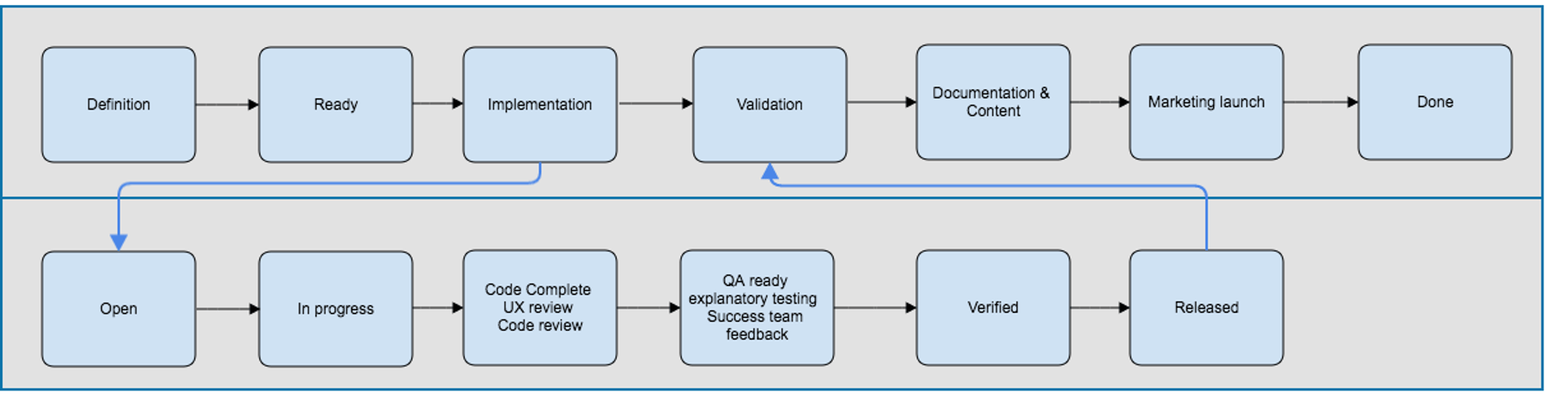
Continuous Delivery Development Process
Be strict about version control
Version control is the cornerstone of any software project. If your team is serious about continuous delivery, put everything into version control—not just source code.
By "everything," I mean build scripts, automated tests, infrastructure-as-code, configurations, and monitoring scripts. This approach lets you track, control, and undo any change in your production system. You'll also know who made each change and why.
Good version control (we use Git) eliminates hours of guesswork when you can access the last known good state instantly. Beyond traditional source control, consider artifact repositories (we use Nexus) to track builds and binaries.
Trunk-based development is worth mentioning here. Rather than maintaining long-lived feature branches, commit directly to the main branch (trunk) multiple times per day. Short-lived branches (ideally lasting fewer than 24 hours) reduce merge conflicts and encourage smaller, more frequent commits. This practice accelerates feedback loops and aligns perfectly with continuous delivery principles.
Define and model your deployment pipeline
The deployment pipeline is the assembly line for your software development process. It transforms raw code into production-ready releases.
In an ideal world, all changes to production—including servers and configurations—pass through the same pipeline. You'd be confident that any change sent through the pipeline could deploy immediately.
As changes move through pipeline stages, your confidence in them increases. While a fully automated pipeline is ideal, you may need decision points and human steps (exploratory testing, for example) built in.
Defining your pipeline model helps you plan improvements and clarifies what the pipeline delivers. It also sets expectations about what you can and cannot guarantee.
The diagram below shows a typical deployment pipeline model.
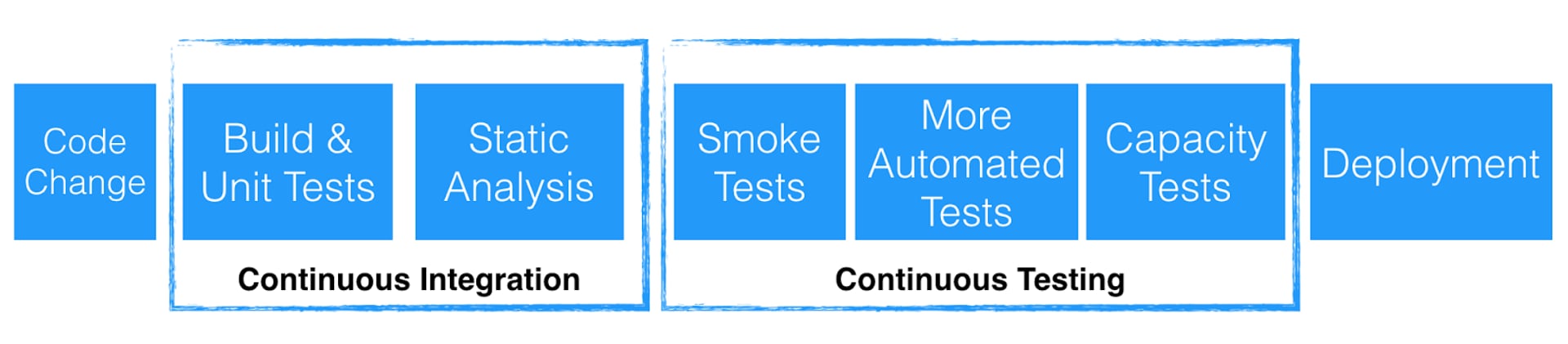
The pipeline should not be an afterthought. Establish it at the start of your project, not after development is underway.
Use continuous integration for your projects
If your deployment pipeline has only one stage, that stage must be continuous integration. Continuous integration has existed for years, yet many teams still don't use it effectively.
Continuous integration systems serve two critical purposes:
First, they provide continuous and fast feedback. Developers learn immediately if their code breaks the build. This rapid feedback lets them fix issues before moving on to the next task.
Second, they protect the main branch. By running automated tests and preventing bad code from merging, continuous integration shields your team from instability. Integration with version control tools makes this enforcement automatic.
Good continuous integration plus a solid branching strategy (such as GitHub Flow) saves teams countless hours.
The key success factor is prioritizing green builds. Make it a team norm that a broken build is the highest priority to fix. This discipline keeps the codebase healthy and deployable at all times.
Security in CI deserves emphasis. Scan dependencies for vulnerabilities, run static code analysis, and check for secrets in commits. Catching security issues early—when they're cheapest to fix—protects your users and your reputation.
Create and implement a quality strategy
The steps in your continuous delivery pipeline reflect your quality bar. You might include performance testing, load testing, and manual exploratory testing.
Additional quality steps increase pipeline cycle time but boost release confidence. Find the balance that fits your risk tolerance.
Two strategies we've found essential are:
- Feature switches: Release features to production but hide them behind a switch. Only users with the switch enabled see the feature. This lets you control exposure and gather feedback safely.
- Canary releases: Deploy code changes to a small subset of servers first. Monitor that subset closely before rolling out to all servers.
Both strategies reduce risk by limiting user exposure. We always canary-release to a set of servers used only by Klipfolio customers before full rollout.
Progressive delivery extends these ideas. Use techniques like blue-green deployments, feature flags, and gradual traffic shifting to release changes with minimal risk. This approach lets you deploy frequently without sacrificing stability.
Remember: frequent releases don't lower quality. In fact, releasing smaller packages more often increases quality because smaller changes are easier to test, understand, and troubleshoot.
Use configuration management tools
Configuration management lets you change server configurations across all environments (development, test, staging, and production) consistently.
It saves time by enabling mass configuration updates. For example, change the database URI all servers point to with a single push, rather than updating servers manually one by one.
Automating configuration eliminates human error and ensures consistency. Store all configurations in version control.
Externalizing configurations from build binaries lets you use the same artifacts across all environments. This increases confidence in your artifacts as they move through the pipeline.
In basic form, configuration management pulls settings from your version control system. As server counts grow, that approach doesn't scale. Consider dedicated tools like Ansible or Terraform at that point.
Implement proper logging and monitoring
Continuous delivery without logging and monitoring is like flying blind. You need visibility into your production servers and client-side errors in browsers and apps.
Prevention is only half the battle. Releases inevitably encounter issues. You must catch and fix problems quickly.
Logging and monitoring let you track release impact on customers. They help you catch bugs and errors, verify that fixes work as intended, and confirm that solutions actually solve the problems they address.
Observability is the modern term for this practice. It goes beyond logs and metrics to include distributed tracing, which shows how requests flow through your system. Tools like Grafana, Datadog, and New Relic provide rich observability. We also use ELK Stack (Elasticsearch, Logstash, Kibana) and an in-house bot that integrates with Slack.
Develop a downtime strategy for your software
Will customers use your software 24/7, or will there be offline periods?
The answer significantly shapes your continuous delivery approach. It affects your tooling, app architecture, and server topology.
Keeping a service up 24/7 while doing daily deployments is challenging. You must choose a strategy that fits your availability requirements.
Two main options for zero-downtime deployments are:
- Rolling restart: Servers are typically stateless. Update and restart them one at a time while traffic routes to other servers. This approach works well for stateless services.
- Blue-green environment: Maintain two identical production environments. Update one while the other serves traffic. After verification, switch traffic to the updated environment. This approach is cleaner but requires double the infrastructure.
Avoid off-hours deployments whenever possible. While appealing on the surface, they burn out your team and prevent you from building the architecture needed for frequent daytime deployments.
Deployments should be routine business-hours tasks, not all-hands events with all-nighters and weekend heroics.
The chart below summarizes the practices we use to make continuous delivery successful:
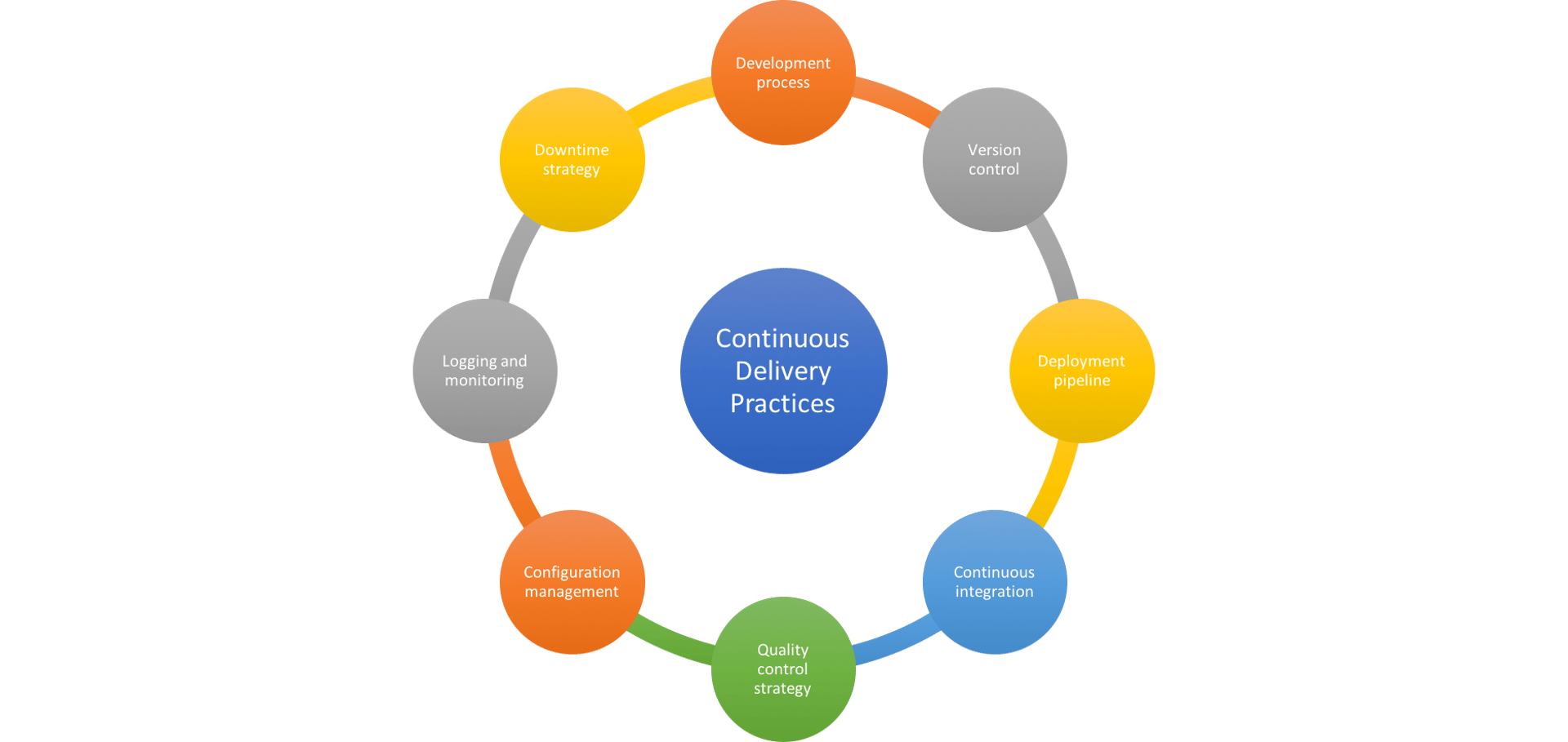
Continuous Delivery Best Practices
In the final post in this series, I'll explore how to embed these practices into your team culture and accelerate your continuous delivery maturity.
Related Articles

Anatomy of a great API
By Danielle Hodgson — January 21st, 2026
Why every digital marketer needs to learn how to deploy marketing technology
By Jonathan Taylor — November 19th, 2025
Top 10 Marketing Dashboard Ideas for Tech Companies